Workflows API – Create, Publish and Monitor Workflows by API
You can now create, publish and monitor workflows by API. Use the Workflows API to build workflows in your apps, publish them and watch them while they run.
✅ What's New
• Create workflows – Build a workflow in a sub-account by sending its definition, including its triggers, steps, branches and settings.
• Publish and pause workflows – Publish a draft, or set a published workflow back to draft. While it's a draft, its triggers are off and it won't accept new enrollments.
• Get workflows – Read one workflow or list many. Filter by status, folder, name and last updated date.
• Delete workflows – Delete a workflow permanently. A deleted workflow stops everyone currently in it.
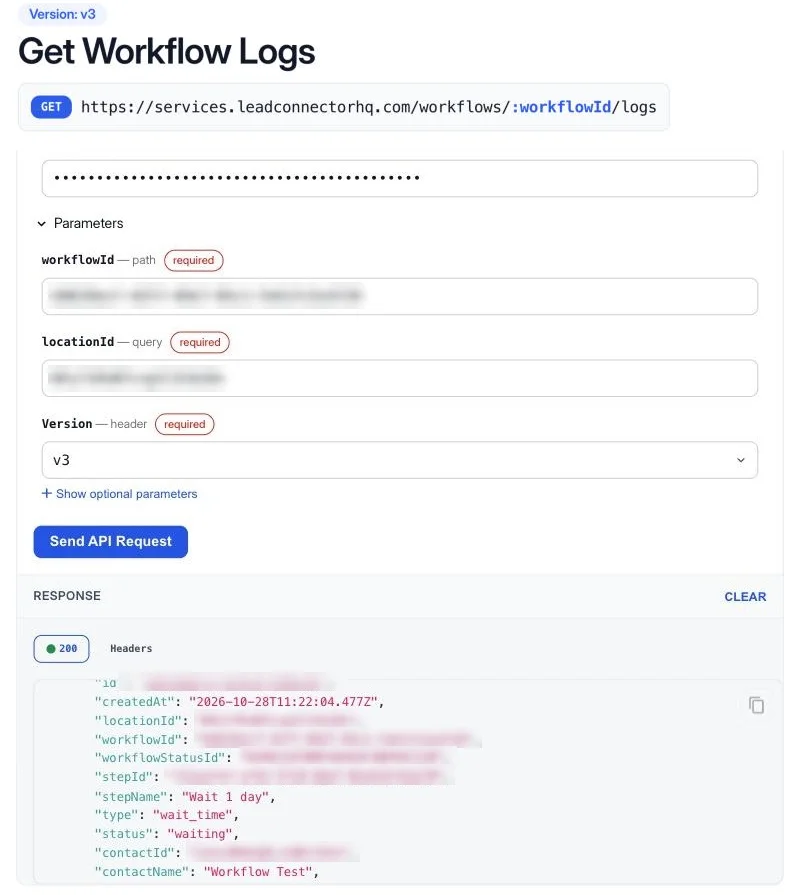
• Get execution logs – See who entered a workflow, what happened at each step and which steps failed, with messages and timestamps.
• Get statistics – Count enrollments, completions and failures per step, by hour, day or week.
🚀 Why This Matters
• Automate how workflows are created and updated
• Watch them while they run
• Use them as a normal part of your app
💡 Example Use Cases
Weekly report
Every Monday, count failures per step for your key workflows → list who was affected → send the summary to your team.
Onboarding from your app
A client signs up in your product → your app creates and publishes their onboarding workflow in their sub-account.
🔌 How to Get Started
- In the sub-account, go to Settings → Private Integrations, create an integration and select the workflow scopes you need: View Workflows, Edit Workflows, Publish Workflows, Delete Workflows and View Workflow Logs.
- Send the token as a bearer token, with the Version: v3 header and the sub-account's locationId on every request.
- Use the Workflows API reference (https://marketplace.leadconnectorhq.com/docs/leadconnector/workflows/workflows-api-v-3) for every endpoint and its fields. Each endpoint page has a request panel to try it with your token.
⚠️ Notes & Details
• Private beta: the Workflows API is enabled for selected sub-accounts. Others get a 403 with WORKFLOW_API_NOT_ENABLED_FOR_LOCATION. Request access with this form (https://link.apisystem.tech/widget/form/qqPIi8Ue6zdqIaHb2cXE).
• Updates replace the whole workflow, so read it first and send back the version you read.
• To edit a published workflow, set it to draft first. While it's a draft, its triggers are off and contacts in it are paused.
• App steps only accept an app account that's already connected in the sub-account.
• Deleting a workflow is permanent and stops everyone currently in it.
• Logs cover up to 30 days per request and go back 60 days. They show live runs; test runs from the builder aren't included.