🚀 New: A Unified Workspace for Managed Agents
Build, test, manage, and publish your Managed Agents — all from one screen!
We've completely redesigned the Managed Agents experience in Agent Studio to make managing AI agents simpler, faster, and more intuitive.
Previously, you had to navigate between multiple pages to manage agents, test conversations, review activity, and publish changes. Now, everything comes together in one unified workspace.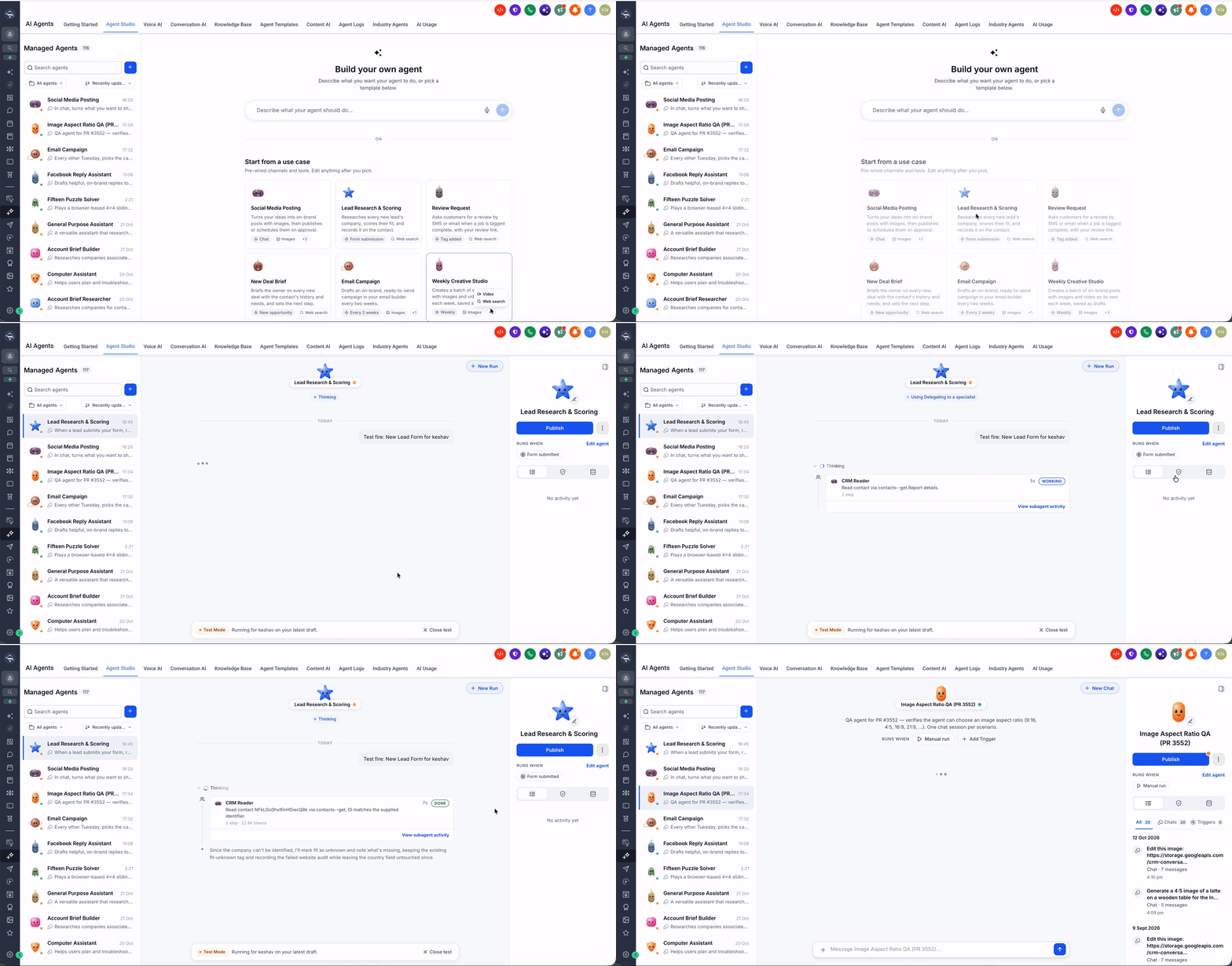
✨ What's New?
🖥️ All-in-One Agent Workspace
Build, test, debug, and publish agents without switching pages — everything you need is in one central workspace.
Keep track of all your agents in a single view with powerful search and filter options.
Quickly access conversation history, activity logs, and agent performance from a centralized location.
Manage agent configurations, folder organization, and publishing status from one intuitive dashboard.
🔍 Easier Agent Discovery & Management
Locate agents quickly with dedicated tabs for All Agents, My Agents, and Folders.
Filter agents by name, deployment status, or folder structure.
View agent details, execution counts, and last activity at a glance.
Switch between Grid and List views to find agents the way you prefer.
💬 Chat, Test & Debug in One Place
Chat directly with agents from the workspace to test behavior in real time.
Use built-in tools like Image, Video, File, and Voice Input to simulate real-world conversations.
View Agent Activity & Logs while chatting to debug and refine agent behavior.
Access Quick Prompts and Suggested Actions to speed up testing and exploration.
⚙️ Simplified Agent Configuration
Rename agents and edit descriptions directly from the workspace.
Publish agents instantly with one click.
Easily identify and manage Agents-in-Draft with clear visual indicators.
Access advanced settings through the More Options menu.
Manage folders and organize agents with drag-and-drop simplicity.
📊 Better Activity & Execution Visibility
Activity: Review the full activity log of an agent, including every workflow triggered and messages sent.
Waiting on You: Quickly view conversations that need your attention and take action.
Agent Logs: Track agent executions, decisions, and workflows in real time.
Memory: See what the agent remembers and manages across interactions.
🤖 Faster Agent Creation
Create a new agent directly from the workspace with a single click.
Choose from preset templates or build your own agent from scratch.
Start building, testing, and deploying faster than ever.
Import & Export agent configurations easily.
🛠️ How to Get Started
Navigate to Labs in your Connect CRM sub-account
Enable "AI Agent Studio" for the Unified Workspace.
Open Agent Studio and explore the new workspace.
Start building, testing, and managing agents all in one place!
🎯 Why This Matters
Everything in one place: No more navigating between multiple pages to manage agents.
Faster testing: Chat, debug, and refine agents in real time.
Simpler management: Organize, filter, and manage agents with ease.
Better visibility: Track activity, logs, and performance from a single dashboard.
Improved productivity: Spend less time navigating and more time building great agents.