Automatic Taxes & Enhanced Address Collection in Forms & Surveys
Collecting payments and managing address details in Forms & Surveys just got a whole lot smarter! 🎉
We're excited to introduce Automatic Taxes support in Forms & Surveys, along with enhanced Shipping and Billing Address capabilities to create a more seamless, native Order Form experience.
From automatically calculating taxes based on customer addresses to collecting separate Billing Addresses and simplifying checkout, we're making it easier than ever to build powerful Order Forms! ✨
🆕 What's New?
💰 1. Automatic Taxes — Let Us Handle the Calculations!
Previously, users didn't have the ability to leverage automatic tax calculations directly within Forms & Surveys.
That's changing! 🚀
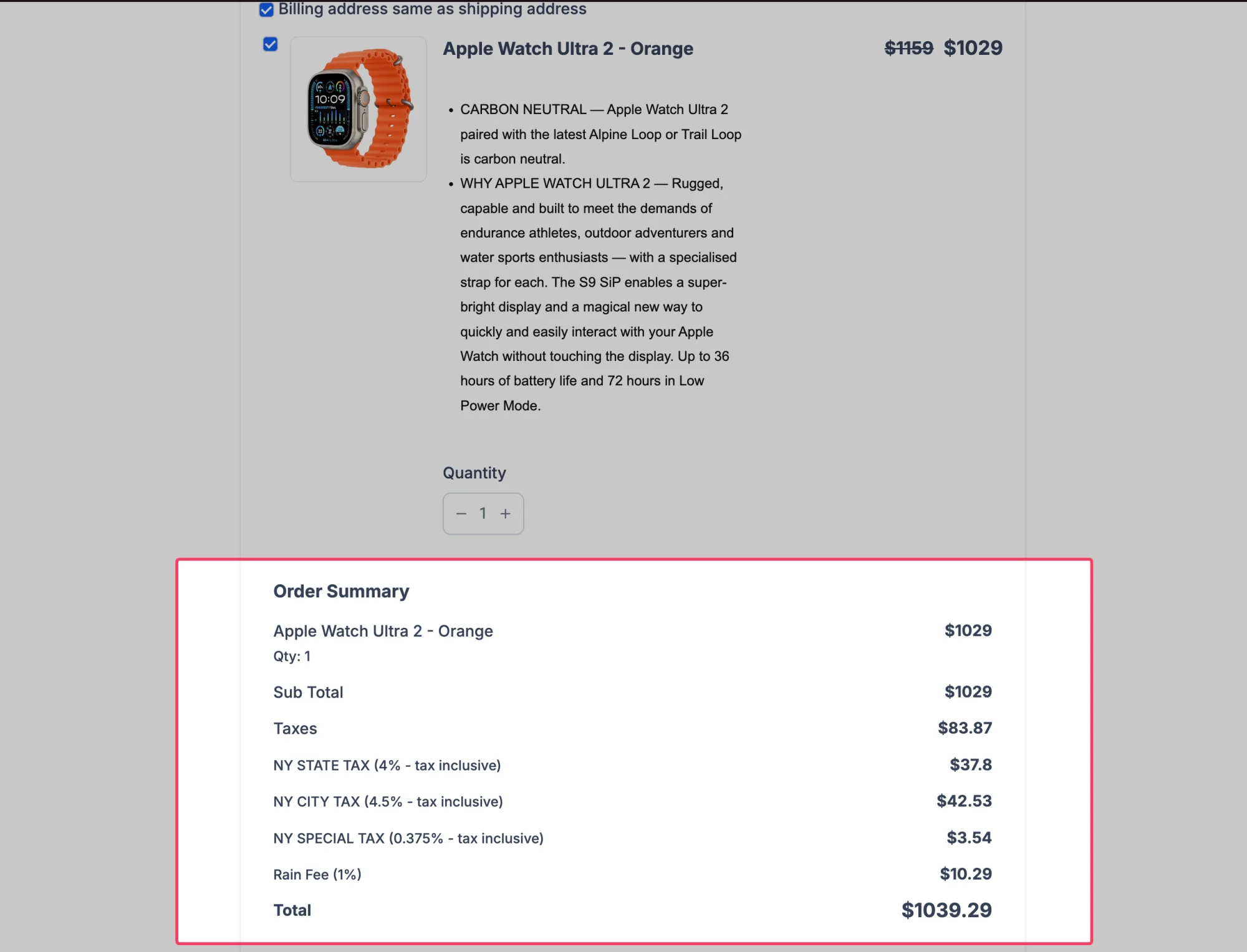
With Automatic Taxes support, users can now use the Address element to determine applicable taxes based on the address information collected from their customers.
Here's what's new:
- 🧮 Automatic Tax Calculation: Taxes can now be calculated automatically using the customer's address details.
- 📍 Address-Based Taxes: The Address element serves as the source of address information used for automatic tax calculations.
- 🛒 Simplified Order Forms: Create payment collection experiences with automatic tax calculation support, reducing the need for manual tax handling.
No more relying solely on manually configured tax amounts when collecting payments through Forms & Surveys.
🏷️ 2. Customizable Address Labels — Call It What You Want!
With Automatic Taxes relying on the Address element, we realized users might want to make the purpose of the Address element clearer.
After all, when you're collecting shipping information, "Shipping Address" makes a lot more sense than a generic "Address" label.
That's why we've introduced the ability to customize the label of the Address element.
What's changed?
- ✏️ Editable Address Labels: Users can now rename the Address element to something more relevant to their use case.
- 📦 Shipping Address Support: Easily label the Address element as "Shipping Address" when collecting delivery details.
- 🎯 Clearer Form Experiences: Give customers better context about the information they're being asked to provide.
A small enhancement that makes a big difference in creating intuitive Order Forms!
🧾 3. Billing Address — Collect Shipping & Billing Details Separately!
We also recognized that a customer's Billing Address might not always be the same as their Shipping Address.
Here's how it works:
- 🧾 Enable Billing Address: Users can now toggle Billing Address collection directly from the Sell Products element.
- 📦 Shipping Address Dependency: Billing Address can only be enabled when the Shipping Address is enabled, ensuring a complete and logical address collection flow.
- 🔄 Consistent Address Fields: The fields displayed in Billing Address automatically mirror the fields configured in the Address element, ensuring consistency.
For example:
If your Address element is configured to collect Street Address, City, State, Postal Code, and Country, your Billing Address will collect the exact same fields.
This ensures a consistent address collection experience without requiring users to configure the same details multiple times.
✅ 4. Same as Shipping Address — A More Native Checkout Experience!
Let's face it — nobody enjoys entering the same address twice! 😅
To make checkout even smoother, we've introduced a "Same as Shipping Address" checkbox for customers to use when their billing and shipping addresses are identical.
Here's what this enables:
- ☑️ Same as Shipping Address: Customers can indicate that their Billing Address is the same as their Shipping Address with a single click.
- ⚡ Less Repetitive Data Entry: Avoid making customers manually enter identical address details.
- 🛍️ Native Order Form Experience: Bring a familiar e-commerce checkout interaction directly into Forms & Surveys.
It's a simple addition that helps make payment collection faster, more intuitive, and more user-friendly.
⚙️ How It Works
- Open Your Builder: Navigate to your Form or Survey containing the Sell Products element.
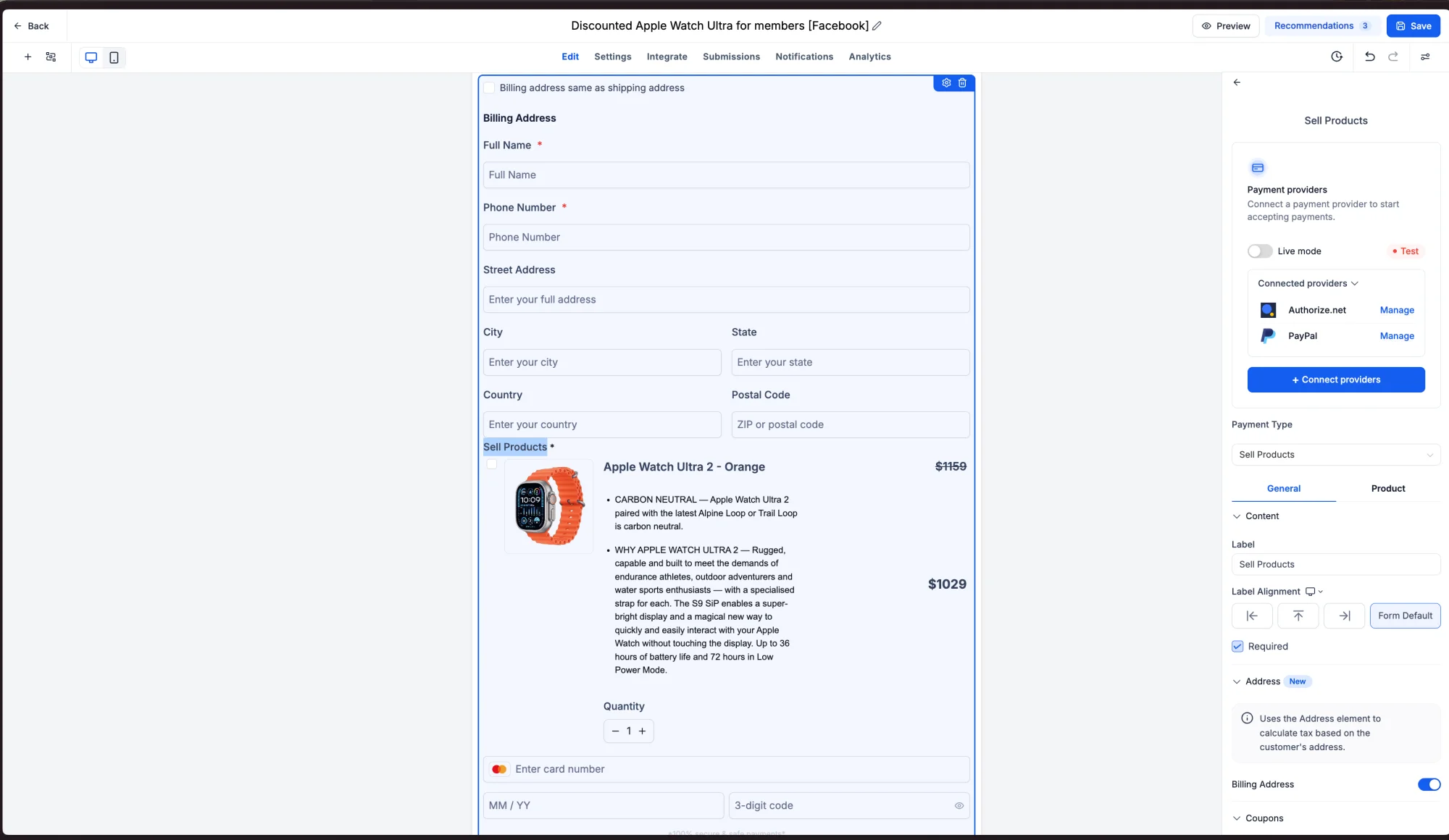
- Configure the Address Element: Add or configure the Address element to collect the required address details for the order.
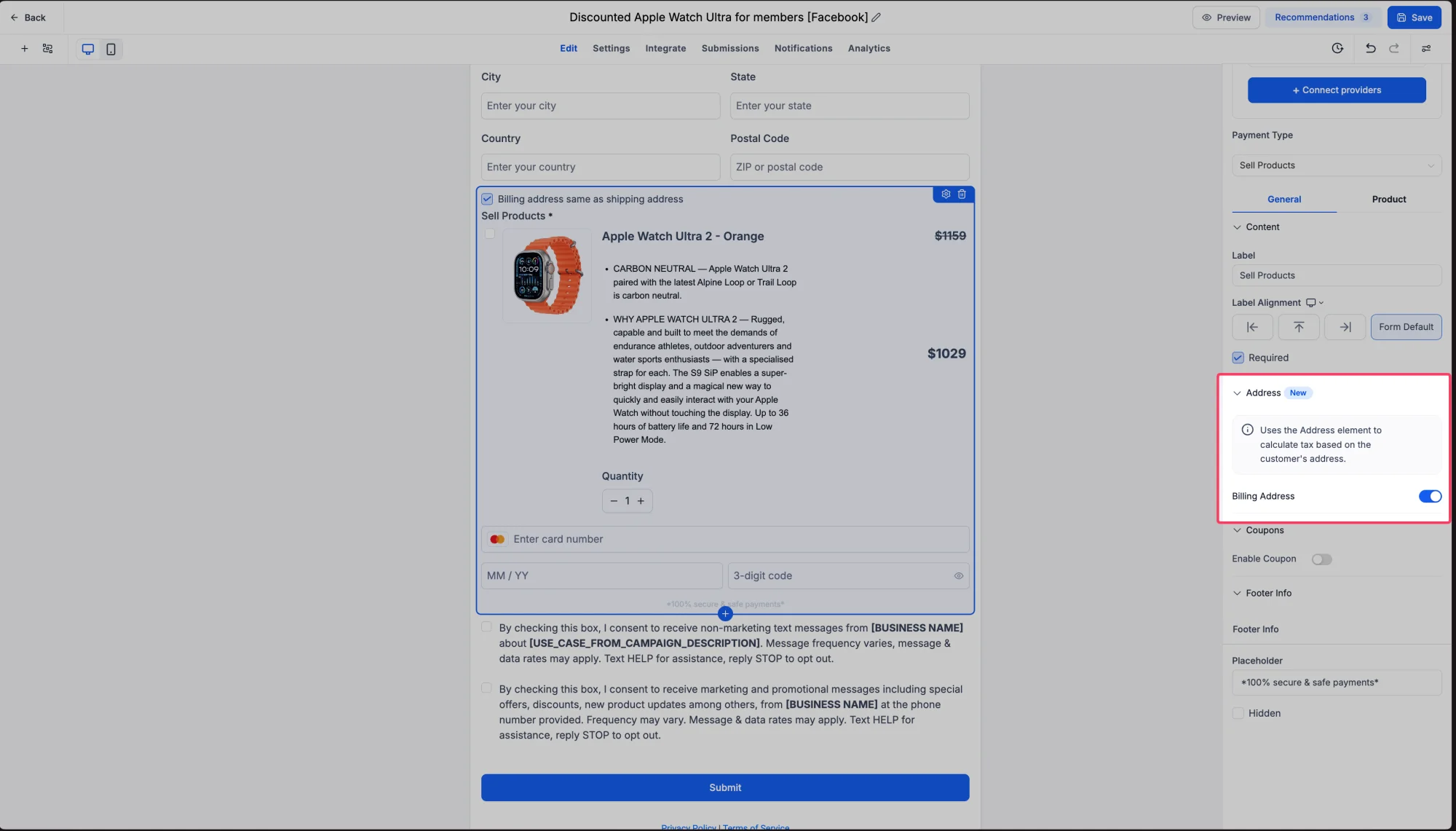
- Customize the Label: Rename the Address element to something like "Shipping Address" for better clarity.
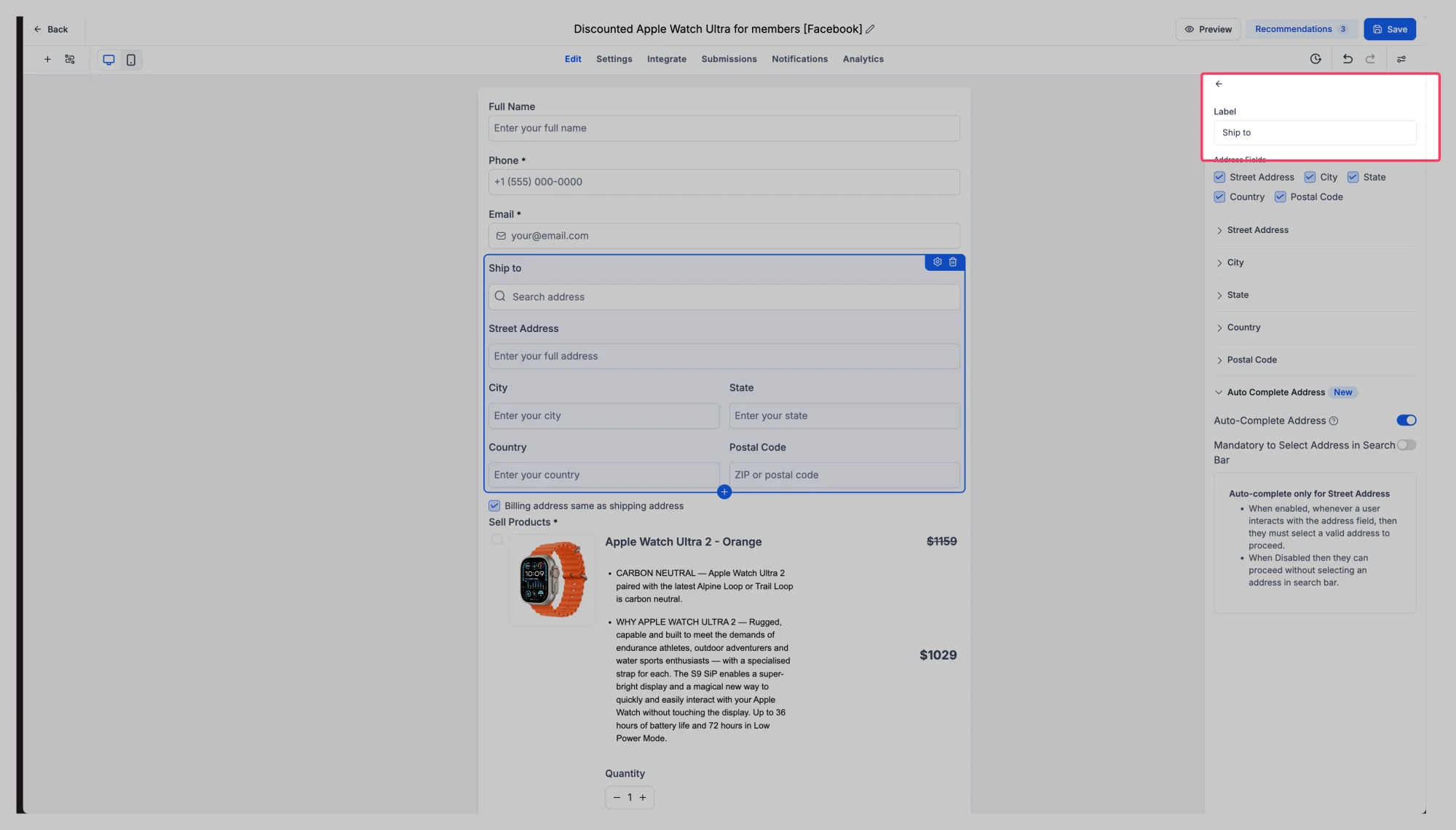
- Enable Automatic Taxes: Configure Automatic Taxes to use the customer's address information for tax calculations.
- Enable Billing Address: Use the new Billing Address toggle within the Sell Products element. Shipping Address must be enabled for this option to appear.
- Collect Address Details: Billing Address will automatically use the same field configuration as the Address element, keeping the experience consistent.
- Simplify Checkout: Customers can select "Same as Shipping Address" when their billing and shipping details match.
⭐ Key Highlights
- Automatic Tax Support: Taxes are calculated automatically using the customer's address.
- Custom Address Labels: Rename the Address element for better clarity.
- Separate Billing Address Collection: Collect Billing Address independently from the Shipping Address.
- Billing Address Toggle: Enable Billing Address directly from the Sell Products element.
- Consistent Field Configuration: Billing Address mirrors the fields configured in the Address element.
- Same as Shipping Checkbox: Simplify checkout with a single-click option for identical addresses.
- Improved Order Form Experience: A more native, intuitive checkout flow for customers.
📝 Notes
- Availability: This feature is available to all users of Forms & Surveys.
- Automatic Taxes: The Address element serves as the source of address information for tax calculations.
- Address Labels: Users can customize the Address element label to fit their specific use case, such as "Shipping Address."
- Billing Address: This can be enabled directly from the Sell Products element.
- Dependency: The Billing Address toggle is only available when Shipping Address is enabled.
- Field Configuration: Billing Address automatically mirrors the fields configured in the Address element.
- Same as Shipping: Customers can quickly select this option to copy their Shipping Address to their Billing Address.
🎯 Why This Matters
Collecting payments through Forms & Surveys should be as seamless as possible — and these enhancements are a big step in that direction.
Automatic Taxes eliminates the need for manual tax configuration, saving time and reducing errors. At the same time, the ability to customize Address labels and collect Billing Address details separately ensures a more professional and intuitive checkout experience.
Whether you're selling products, collecting donations, or managing service payments, these updates help you create Order Forms that are smarter, faster, and more user-friendly.
We're excited to see how you'll use these new capabilities to elevate your payment collection workflows!
Smarter Taxes. Smoother Checkouts. Better Order Forms! 🚀